What Is a Status Page? Benefits, Examples and How to Set One Up
A status page tells customers whether your service is working before they have to ask. Here is what to put on one, how it cuts support tickets during outages, and how to set one up in minutes.
When something breaks, customers want to know two things straight away: is it just me, and are you on it? If they cannot find an answer, they email support, post on social media, or quietly decide you are unreliable.
A status page answers both questions before anyone has to ask. In this guide we will look at what a status page is, why even small businesses benefit from one, what to put on it, and how to write updates people actually trust.
What is a status page?
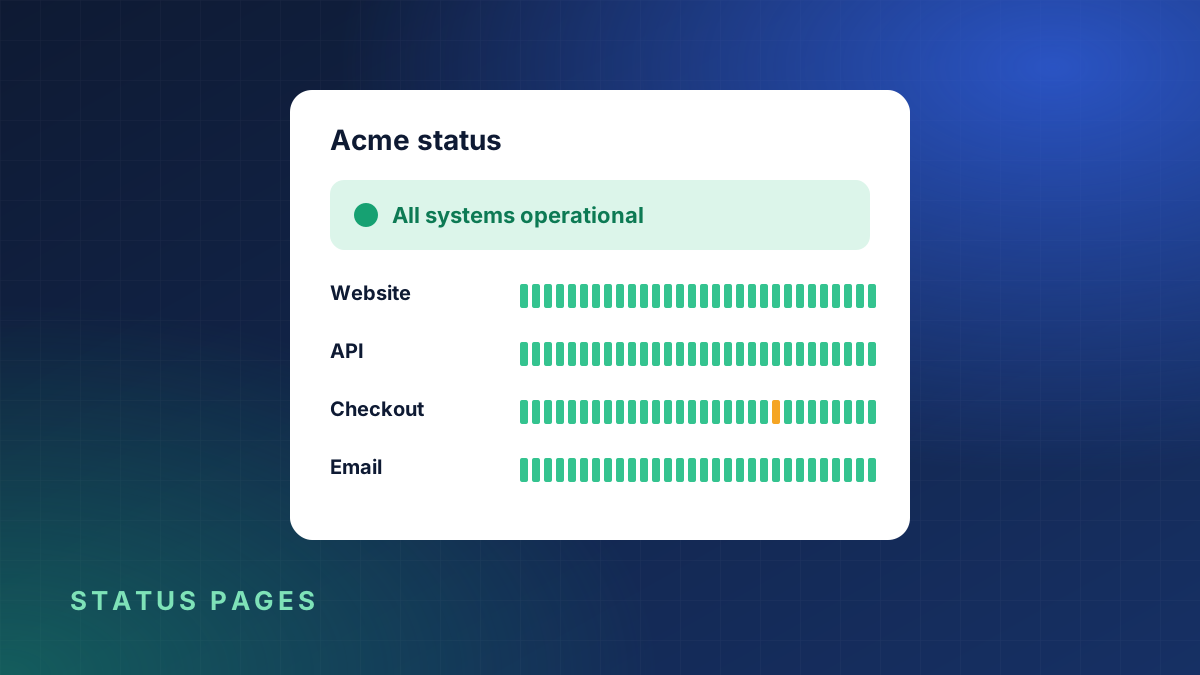
A status page is a simple public web page that shows whether your services are working right now, along with recent incidents and planned maintenance. It usually lives at an address such as status.yourcompany.com.
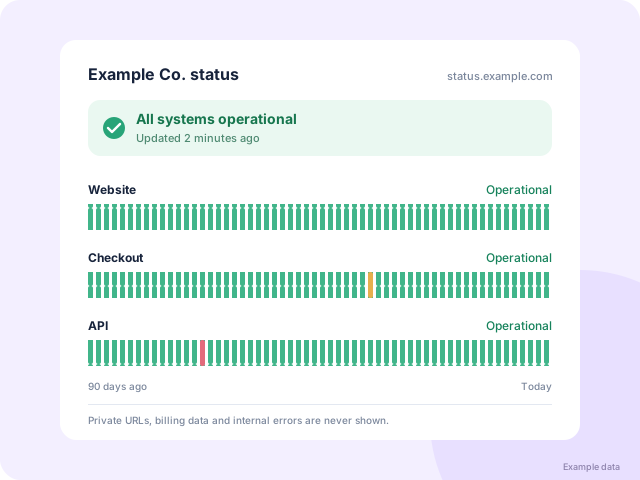
A typical status page shows:
- an overall status, such as All systems operational,
- a list of components, for example Website, API, Checkout and Email,
- an uptime history bar for each component, often covering 30 to 90 days,
- current and past incidents, with timestamped updates,
- upcoming maintenance windows.
Why have one?
Fewer support tickets during an outage
During an incident, your support inbox fills up with the same question. A status page answers it once for everyone. Teams that publish updates promptly usually see far fewer "is it down?" messages, which frees people to fix the actual problem.
Trust through transparency
Every service has problems now and then. What customers remember is how you handled it. A page that admits a problem quickly, explains what is affected and confirms when it is fixed builds more trust than a site that pretends nothing happened.
Proof of reliability
Uptime history is evidence. When a prospective customer asks how reliable you are, a status page with months of green bars answers better than any marketing claim.
A single source of truth for your team
Sales, support and management can all check the same page instead of interrupting the person fixing the problem.
What to include on your status page
Keep it simple and focused on what customers care about.
Components customers recognise
Name components in your customers' language. "Checkout" means more to a shopper than "payments-service-eu". Split things up only where customers experience them separately. Four to eight components is plenty for most businesses.
Automatic status from monitoring
A status page is only useful if it is accurate. Connect it to uptime monitoring so components turn red automatically when checks fail, rather than relying on someone remembering to update it at 3am.
Incident updates written by a person
Automation tells people that something is wrong. A short human update tells them what you are doing about it.
Maintenance announcements
Announce planned work a few days ahead, with start and end times in a clear time zone.
How to write incident updates
Good updates are short, honest and regular. A simple four-stage pattern works well:
- Investigating. "We are investigating reports that checkout is failing for some customers. Next update in 30 minutes."
- Identified. "We have found the cause, a problem with our payment provider's connection, and are working on a fix."
- Monitoring. "A fix is in place and checkout is working again. We are monitoring to make sure it stays stable."
- Resolved. "This incident is resolved. Checkout was unavailable for some customers between 14:05 and 14:40 UTC."
A few rules of thumb:
- Post the first update fast, even if you know very little. "We are aware and investigating" is far better than silence.
- Say when the next update will come, and keep that promise even if there is no news.
- Avoid blame and jargon. Customers want to know what is affected and when it will be fixed.
- Always include start and end times in the final update.
The first update matters most. Customers forgive outages much more easily than they forgive feeling ignored.
Public or private?
Most businesses should make their status page public. If your customers are internal teams, or you only want to share status with specific clients, a private or password-protected page can work too. Either way, never show internal details such as server names, IP addresses or private URLs.
Uptime badges
A small badge on your website or in your documentation that shows live status or 30-day uptime is a nice touch. It links visitors to the full status page and shows confidence in your reliability.
How to set up a status page with KeepUpTime
- Add uptime monitors for the things customers use, such as your website, API and checkout.
- Open Status pages in your dashboard and create a page.
- Choose which monitors to show and give each one a customer-friendly name.
- Share the link from your website footer, help center and support email signature.
- Optional: add the uptime badge to your site.
From then on, the page updates itself from your monitoring data, and every incident appears in the history automatically.
Frequently missed details
- Link to it where people look. Footer, help center, login page and error pages are all good places.
- Host it separately. If your main server is down, a status page on the same server goes down with it. A hosted status page avoids that.
- Use UTC or state your time zone. Customers in other countries need to know when things happened.
- Keep the history. Do not delete old incidents. A long, honest history is what makes the page credible.
A status page is one of the cheapest ways to look professional during the worst moments. If you already monitor your website, you are most of the way there. Start a free trial and you can publish your first status page today.